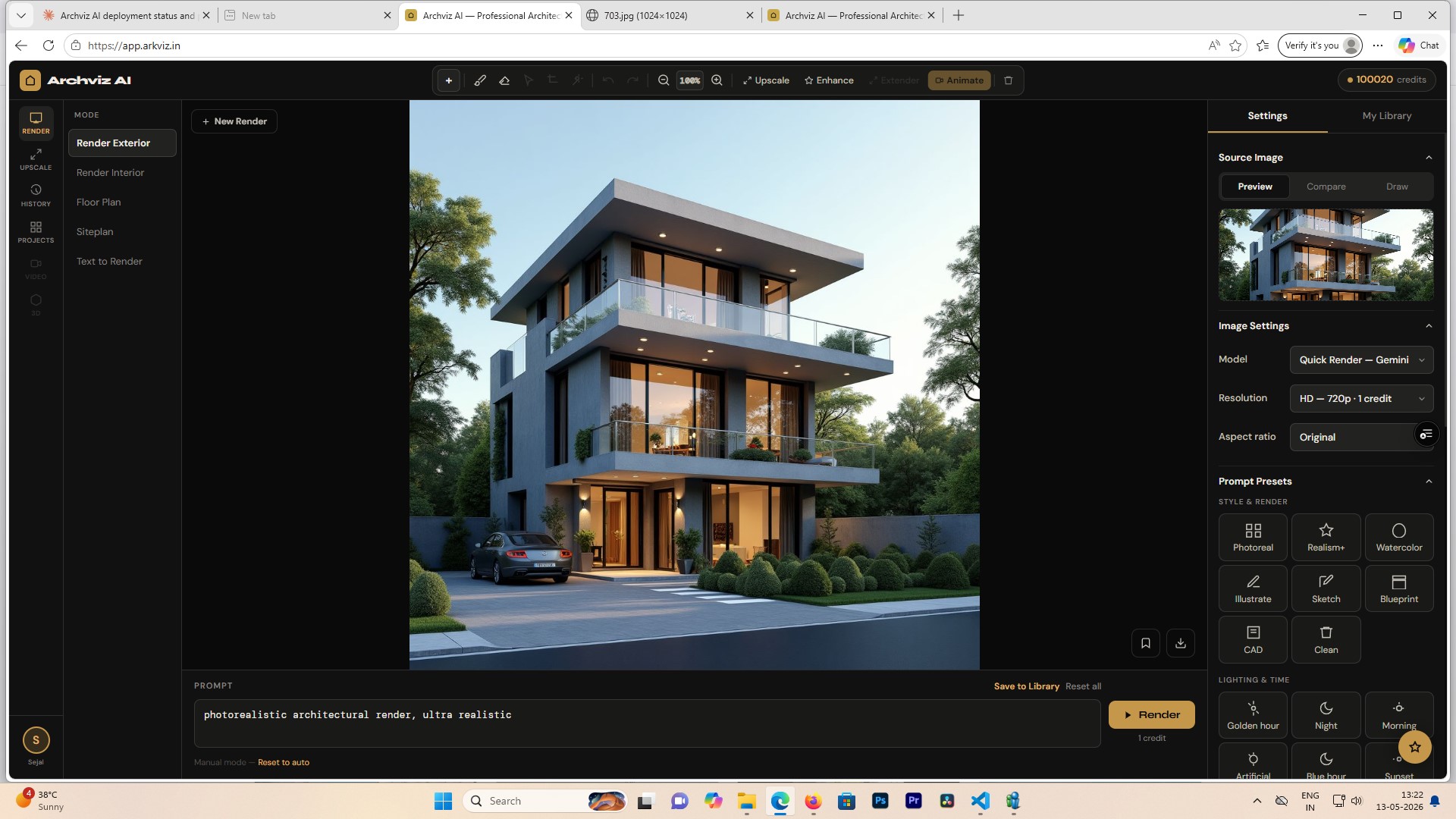
AI-Powered Architectural Visualization

Transform floor plans into
photorealistic renders
in seconds

Professional-grade exterior, interior, isometric and site plan renders — powered by AI. Built for architects, designers and developers.

Start for free  → See how it works

10 free credits on signup · No credit card required

app.arkviz.in
Mode
Render
Upscale
History
Projects
Render Mode
Render Exterior
Render Interior
Floor Plan
Siteplan
Drop your image here to render
Output Type
Isometric 3D — Dollhouse
Style
Modern
Luxury
Scandinavian
Industrial
Lighting
Daytime
Golden Hour
Night
Model
Quick Render — Gemini
⚡ Generate   3 credits
Faster than traditional rendering
6
Render modes in one platform
10
Free credits on signup
4K
Maximum output resolution
What you get

Everything you need to
visualize your project

🏛️

Exterior Render

Upload a SketchUp model or reference image and get a photorealistic exterior render with custom lighting, sky, and materials.

🛋️

Interior Render

Transform rough interior shots or floor plan images into styled interior CGI with furniture, lighting, and material palettes.

📐

Floor Plan 3D

Convert 2D floor plans into top-down 3D renders, dollhouse isometric views, or per-room interior perspectives automatically.

🗺️

Site Plan Render

Turn 2D site drawings into photorealistic aerial drone views, isometric neighbourhood renders, or ground-level perspectives.

✏️

Inpainting & Edit

Brush over any area of your render to replace elements — swap furniture, change materials, or add objects with a reference image.

🔍

Upscale to 4K

Enhance any render to ultra-high resolution with AI upscaling. Crisp details, sharp edges, ready for client presentations.

From drawing to render
in four steps

1

Upload your image

Upload a floor plan, site drawing, exterior photo, or SketchUp export.

2

Choose mode & style

Select your render mode, style preset, lighting, and resolution.

3

Generate

AI processes your image and returns a photorealistic render in seconds.

4

Download & present

Download at full resolution, save to projects, or upscale to 4K.

Render Modes

Six ways to
visualize your work

Exterior

Render Exterior

Photorealistic building renders with custom sky, season, lighting and material styles from any reference image or model export.

Before / After render · Drop in your image
Interior

Render Interior

Generate styled room interiors with furniture, lighting, and colour palettes. Supports living room, kitchen, bedroom, and more.

Interior render preview
Floor Plan

Floor Plan 3D

Top-down 3D, dollhouse isometric cutaway, or room-by-room interior renders — all from a single 2D floor plan image.

Floor plan → 3D dollhouse
Site Plan

Site Plan Render

Aerial drone views, isometric neighbourhood layouts, or ground-level perspectives from 2D site plan drawings.

Site plan aerial view

Flexible plans for
every workflow

Starter
199/pack
25 credits · ₹8/credit
  • All render modes
  • HD resolution
  • Credits never expire
  • Project history
Buy 25 credits
Studio  BEST VALUE
999/pack
200 credits · ₹5/credit
  • All render modes
  • Up to 4K resolution
  • All AI models
  • Full editing tools
  • Credits never expire
Buy 200 credits

Credits never expire · 10 free credits on signup · Agency pack ₹1999 for 500 credits also available

Questions

Frequently
asked questions

What file formats can I upload? +
You can upload JPG, PNG images up to 20MB. This covers SketchUp screenshots, CAD exports, floor plan scans, site drawings, and any reference photography.
How long does a render take? +
Most renders complete in 15–45 seconds depending on the model and resolution selected. 4K upscaling takes slightly longer.
Do credits expire? +
Credit pack credits never expire — use them whenever you need. Subscription credits refresh monthly, and unused credits carry over to the next month.
Can I use the renders commercially? +
Yes. All renders generated on Archviz AI are yours to use for commercial purposes including client presentations, marketing materials, and publications.
What AI models power the renders? +
Archviz AI uses a combination of Google Gemini and Flux Kontext models, each tuned for different render types and quality tiers. You can choose the model from the settings panel.
Is there a subscription plan? +
Yes — you can choose between one-time credit packs (₹199–₹1999, credits never expire) or monthly subscription plans starting at ₹299/month with auto-renewing credits. Both options are available from inside the app.
What is the difference between credit packs and subscriptions? +
Credit packs are one-time purchases — buy when you need, use at your own pace, credits never expire. Subscriptions give you a fixed monthly credit allowance at a lower per-credit rate, with unused credits carrying over. Ideal if you render regularly.
Get started today

Your first 10 renders
are on us

Sign up in seconds and start generating professional architectural visualizations immediately. No credit card required.

Create free account →